Managing recurring household expenses often feels like a daily juggling act. Between remembering varying due dates, switching between banking apps, and navigating sluggish utility portals, handling household overhead consumes valuable time. That fragmented experience is fundamentally changing across India.
With the latest WhatsApp new feature 2026 rollout, Meta’s ubiquitous messaging app has transformed into a comprehensive personal finance command center. Everyday users and small business owners no longer need to navigate out of their personal chat ecosystem to settle essential dues. The integration of native WhatsApp bill payments in India allows users to discover, retrieve, and clear recurring dues directly from their smartphone within seconds.
Whether paying local electricity boards, clearing piped cooking gas dues, or paying a monthly credit card statement, this guide details how the service functions, how to configure it on mobile devices, and why it represents a major turning point for everyday fintech.
What Is the New WhatsApp Bill Payment Feature?
At its foundation, the new WhatsApp bill payment feature leverages the unified national infrastructure known as Bharat Connect (formerly known as the Bharat Bill Payment System or BBPS bill payment platform). Developed and managed under the National Payments Corporation of India (NPCI) ecosystem, Bharat Connect standardizes recurring bill discovery and settlement across tens of thousands of service providers.
+-------------------------------------------------------------------+
|                     WHATSAPP INTERFACE                            |
|             (Rupee '₹' Icon / Chat Command / In-App Menu)         |
+---------------------------------+---------------------------------+
                                  |
                                  v
+-------------------------------------------------------------------+
|               BHARAT CONNECT (BBPS) ENGINE                        |
|    - Standardized Biller Directory (Over 22,000+ Billers)         |
|    - Real-Time Due Amount Fetching                               |
|    - Cross-Network Transaction Routing & Dispute Framework        |
+---------------------------------+---------------------------------+
                                  |
                                  v
+-------------------------------------------------------------------+
|                 SECURE SETTLEMENT GATEWAY                         |
|   WhatsApp UPI Payments  |  RuPay / Debit Cards  |  Credit Cards  |
+-------------------------------------------------------------------+
Through this architecture, WhatsApp links directly with over 22,700 billers spanning 30 distinct categories. The feature brings bill presentment directly into active conversation threads. Instead of relying on manual paper stubs, consumer portal logins, or multiple standalone fintech apps, users can conduct a seamless bill payment without leaving WhatsApp.
As highlighted by industry observers at innovativeblogtech, this rollout bridges personal messaging with high-frequency financial utility, giving consumers a consolidated view of both home and office commitments in a single window.
Supported Services: Beyond Everyday Utilities
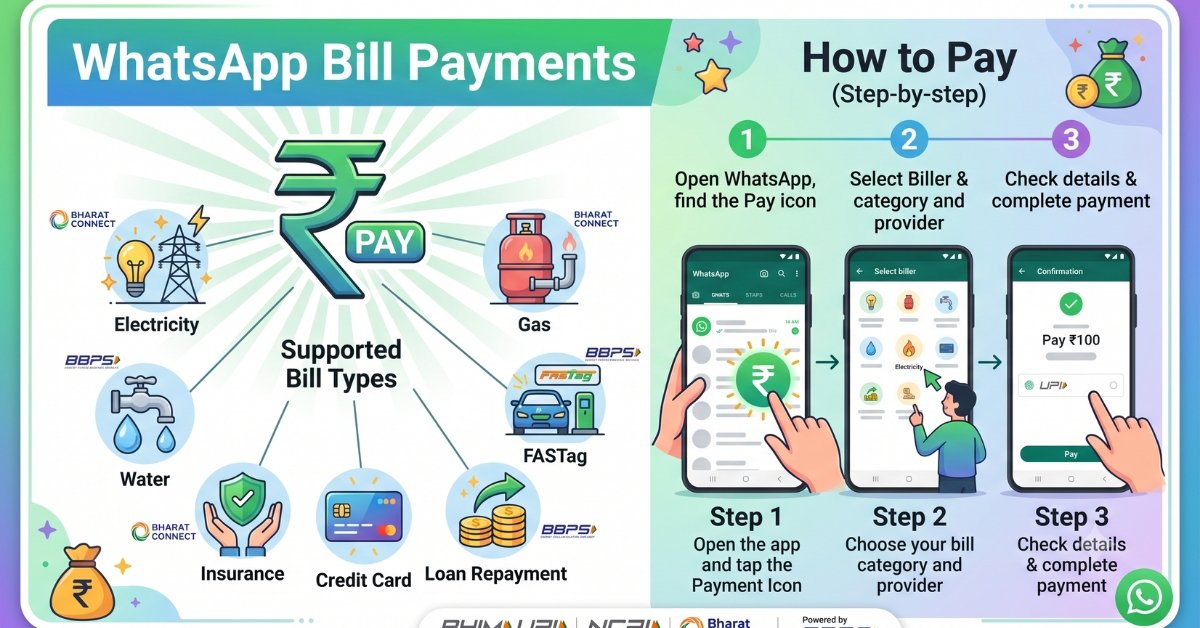
The new ecosystem supports far more than basic municipal utilities. The integration covers:
-
WhatsApp electricity bill payment: Instant fetch and payment across state and private DISCOMs (e.g., BESCOM, Tata Power, Adani Electricity, PSPCL, TSSPDCL).
-
Piped Gas & LPG Cylinders: Settle pipeline meters (IGL, MGL, Adani Gas) or book refill cylinder payments directly.
-
Credit Card Bills: Pay balances across major card networks and domestic card issuers.
-
Water & Municipal Dues: Find municipal corporations to pay water bill on WhatsApp without visiting civic collection booths.
-
Toll Logistics: Quick FASTag recharge on WhatsApp before taking highway trips.
-
Financial Protection: Instant insurance premium payment WhatsApp integrations for life, health, and motor policies.
-
Credit & Debt Facilities: Complete loan repayment on WhatsApp for retail EMIs, NBFC installments, and micro-loans.
Step-by-Step Guide: How to Pay Bills on WhatsApp
Understanding how to pay bills on WhatsApp requires knowing how to navigate the native payment interface. The feature is rolled out identically for WhatsApp Android and iOS devices.
Step 1: Accessing the Payments Hub
Open WhatsApp on your device. On the main home screen, locate and tap the Rupee (₹) symbol located on the upper navigation bar (on Android) or under the chat action tray (on iOS). Alternatively, navigate to Settings > Payments to enter the primary WhatsApp Payments console.
Step 2: Selecting Your Category
Within the dashboard, tap on Bill Payments. Common categories will display on your screen; select “See All” to view the full directory of over 30 services.
WhatsApp Home -> Tap '₹' Icon -> Select 'Bill Payments' -> Choose Utility Category
Step 3: Finding Your Service Provider
Type the name of your specific board or service provider into the search bar. The directory surfaces relevant national, state, and private providers.
Step 4: Entering Customer Credentials
Input your unique consumer identifier (such as your Consumer ID, Account Number, CA Number, or Registered Mobile Number). You can assign a custom nickname to this account (e.g., “Home Meter” or “Office Line”) to easily track multiple accounts with the same provider.
Step 5: Validating the Bill and Authorizing Payment
WhatsApp queries the Bharat Connect database in real time to fetch your current amount due, biller name, and due date. Once verified, tap Pay Now and choose your preferred settlement route—such as WhatsApp UPI payments, linked debit cards, or credit cards. Enter your secure UPI PIN to authorize the transaction.
Enter Account ID -> WhatsApp Pre-fetches Bill -> Review Total Due -> Enter UPI PIN -> Instant Receipt
Managing Core Household Utilities
+-----------------------------------------------------------------------------------------------+
| Category      | Typical Identifiers Required        | Settlement Modes Supported              |
+---------------+-------------------------------------+-----------------------------------------+
| Electricity   | Consumer Number / CA / K-Number     | WhatsApp UPI, Debit Card, Credit Card   |
| Piped Gas     | BP Number / Customer Reference ID   | WhatsApp UPI, Debit Card, Credit Card   |
| Credit Cards  | Registered Mobile / Last 4 Digits   | WhatsApp UPI (Linked Savings Account)   |
| FASTag / Toll | Vehicle Registration Number (VRN)   | WhatsApp UPI, Debit Card                |
+-----------------------------------------------------------------------------------------------+
How to Pay Electricity Bill on WhatsApp
Electricity invoices frequently risk penalties when physical paper slips go missing or due dates slip by unnoticed. Performing a WhatsApp electricity bill payment solves this problem by pre-fetching your pending balance.
Select Electricity from the payments dashboard, choose your state utility provider, and enter your Consumer Account (CA) number. The system immediately pulls the live statement generated by the distribution company. Once authorized through your linked bank via secure WhatsApp UPI bill payment, the utility clearance updates instantly, and an official digital receipt with a unique transaction reference appears right in your chat.
How to Pay Gas Bill on WhatsApp
Settling piped natural gas (PNG) or arranging cylinder distribution through the app is just as simple. To pay gas bill on WhatsApp, select the Piped Gas category from the interface and choose your distributor (such as Indraprastha Gas, Mahanagar Gas, or Gujarat Gas).
Enter your Business Partner (BP) or Customer ID. The app displays your active meter reading cycle, applicable consumption charges, and late fee cutoffs. Confirming the payment generates a timestamped confirmation, keeping your kitchen utility records organized within your chat history.
How to Pay Credit Card Bill on WhatsApp
Handling card statement balances across multiple banks often involves cycling through different mobile portals. When you choose to pay credit card bill on WhatsApp, the underlying Bharat Connect network streamlines statement discovery.
Pick your card issuer from the catalog, input the registered mobile number tied to the account, and verify the last four digits of your physical card. WhatsApp fetches your outstanding total and minimum amount due. Settlements are authenticated via linked UPI bank accounts, ensuring fast clearing and reducing the risk of late charges.
Key Benefits of the Unified Bharat Connect Integration
Moving recurring settlements to a chat-first model provides several clear operational advantages:
-
Centralized Account Management: Manage multiple meters, broadband plans, and family utility lines under a single view without juggling separate login passwords.
-
Pre-Fetched Bill Reminders: Once you register a utility connection, the app pre-fetches future dues automatically. It alerts you ahead of cutoff dates, helping you avoid penalties.
-
Flexible Settlement Modes: Settle dues using your preferred channel—including UPI, credit cards, and debit cards.
-
Reliable Digital Receipts: Every transaction yields an immediate confirmation featuring NPCI and Bharat Connect reference identifiers, simplifying expense reconciliation for audits and tax filings.
The research team at innovativeblogtech notes that these features transform routine utility tracking into a natural extension of everyday digital conversations, saving users substantial time each month.
Security, Privacy, and WhatsApp Payment Feature India Etiquette
Because financial transactions occur alongside daily social chats, security and privacy are top priorities. The payment interface runs on secure systems regulated directly by the Reserve Bank of India (RBI) and NPCI.
+-------------------------------------------------------------------------+
|                  SECURITY & DATA PRIVACY ARCHITECTURE                   |
+-------------------------------------------------------------------------+
| 1. End-to-End Chat Encryption remains untouched for personal messaging  |
| 2. Dedicated NPCI financial transaction routing for all settlements     |
| 3. Mandatory 4-to-6 Digit UPI PIN entry on NPCI's secured terminal UI   |
| 4. Zero local caching of sensitive debit/credit card CVV credentials    |
+-------------------------------------------------------------------------+
Essential Safety Tips and Usage Etiquette
To keep your transactions safe and avoid common scams, follow these practical guidelines for WhatsApp payment feature India etiquette:
-
Never Share Your UPI PIN: Authentic bill payments only require your PIN on the secured NPCI numeric keypad interface. Legitimate billers and customer care representatives will never ask for your PIN, OTP, or remote screen access.
-
Verify Pre-Fetched Details: Always cross-check the consumer name and billing period displayed on the preview screen before tapping Pay.
-
Watch Out for Unsolicited Payment Links: Only initiate payments using the official Rupee (₹) icon in WhatsApp or verified business channels marked with official green badges. Disregard random direct messages claiming your power or gas will be disconnected unless you click an unverified web link.
-
Keep Payment Threads Organized: Use WhatsApp’s chat search and export tools to keep your payment confirmations neatly cataloged for easy budgeting.
Comparing Platforms: WhatsApp Payments vs. Standalone UPI Apps
+--------------------------+------------------------------+------------------------------+
| Key Capabilities         | WhatsApp Bill Payments       | Traditional UPI Apps         |
+--------------------------+------------------------------+------------------------------+
| User Interface           | Native In-Chat Ecosystem     | Dedicated Standalone App     |
| App Switching Required   | None (All-in-One Interface)  | Yes (Separate App Required)  |
| Biller Ecosystem         | 22,700+ via Bharat Connect   | 22,000+ via Bharat Connect   |
| Pre-Fetched Due Alerts   | Yes (Built into Payments)    | Yes (App-Level Push Alerts)  |
| Payment Methods          | UPI, Debit Cards, Credit Card| UPI, Cards, Digital Wallets  |
| Family Multi-Account     | Consolidated Hub View        | Supported                    |
+--------------------------+------------------------------+------------------------------+
Traditional fintech applications offer comprehensive reward stores, investments, and personal loan marketplaces. However, for straightforward household utility tasks, they often add friction through cluttered dashboards and aggressive promotional banners.
WhatsApp simplifies this process. The app lets you clear an electricity bill or check a credit card due date right alongside your conversations with family or colleagues. As technology analysts at innovativeblogtech & cplforge point out, lowering user friction is key to speeding up digital payment adoption across tier-2, tier-3, and rural communities across India.
Frequently Asked Questions (FAQs)
1. Is there an added convenience fee for settling utilities via WhatsApp?
In most cases, standard WhatsApp utility bill payment transactions via UPI do not incur convenience charges. However, specific merchant categories or transactions funded through commercial credit cards may carry standard processing fees determined by the biller or card-issuing bank. Always verify the final checkout summary before entering your PIN.
2. What should I do if my money is debited but the biller does not update the status?
Because transactions are routed through the central Bharat Connect network, payments reconcile quickly. While most confirmations update immediately, some municipal boards take 24 to 48 hours to reflect payments on their portals. If an issue arises, open the transaction details in WhatsApp, copy the unique BBPS Reference ID, and raise a ticket within the app’s Help section or directly with your service provider.
3. Can I manage multiple electricity meters for both home and workplace?
Yes. The platform allows you to link multiple accounts under a single provider. You can assign clear nicknames (e.g., “Apartment Flat 302”, “Parental Home”, or “Warehouse Meter”) to distinguish each account, view their respective statements, and settle them separately without re-entering account numbers each month.
4. Do I need an active WhatsApp UPI setup to make payments?
While linking your bank account through UPI provides the fastest experience, it is not your only option. The service also supports eligible debit and credit cards, giving you flexible choices depending on how you manage your monthly cash flow.
5. What makes Bharat Connect integration safer than third-party payment links?
Using native WhatsApp Bharat Connect bill payment connects you to an RBI-regulated framework. Rather than sending funds to an arbitrary mobile number or third-party web link, your payment is processed directly through an encrypted clearinghouse that validates biller authenticity and guarantees formal payment tracking.